

Best Construction Security Camera Systems for Large Sites in 2025

Security and legal note: This guide shares general information for construction teams in California. It is not legal advice or a full security design. Please talk with your attorney, insurer, and local law enforcement before you make final decisions.

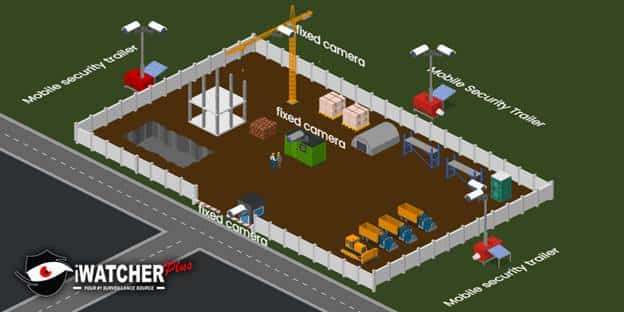
If you are running a big project in Riverside, Los Angeles, Anaheim, San Diego, or anywhere across California, the short answer is this: for most large sites, the best setup is a hybrid construction security camera system built around solar mobile security trailers plus a few fixed security cameras on key buildings and gates. Purely fixed systems are rarely flexible enough for a changing jobsite, and guards alone are expensive and easy to work around.

In this guide we will walk through what that looks like in real life, how to compare your options, rough costs, and exactly what to do this week if you need fast coverage.
image

Why large construction sites are prime targets and why cameras matter

Across the United States, construction site theft costs hundreds of millions of dollars every year, with many estimates clustering around 300 million to 1 billion dollars in direct losses. California is consistently ranked among the states with the highest number of theft incidents.  (Shrestha & Osborne, 2019)

A single incident can easily cost $30,000 or more once you add equipment, materials, rentals, and lost time.

Why thieves love big job sites

Large or multi acre projects are attractive because they often have:

  • High value equipment and materials (copper, lumber, rebar, generators, skid steers)
  • Wide open perimeters with temporary fencing
  • Dark corners and blind spots at night
  • Constant flow of subcontractors and deliveries
  • Gaps between security guards’ patrols

On top of theft, you have other risks:

  • Vandalism and graffiti
  • After hours trespassing and partying
  • Accidents and safety incidents that need clear video
  • Unauthorized access lawsuits or claims

What cameras can do that guards and fences cannot

Fences and guards are still useful, but a Construction Security Camera system adds things they simply cannot provide:

  • 24/7 recording, not just when someone is watching
  • Multiple angles on the same event
  • Clear evidence for police and insurance
  • Remote access from phone, tablet, or laptop
  • Smart alerts when someone crosses a line, jumps a fence, or walks into a no go zone

Modern construction site CCTV is also proven to help with safety, claims, and worker behavior because people know they are being recorded in public work areas. (priorityfirst.co.uk Welsh & Farrington, 2009;Piza et al., 2019)

As one superintendent in Riverside told us:

“We used to shrug off small thefts as part of the job. Once we added mobile security trailers with live monitoring, the problem basically stopped, and our guys feel safer at night.”

For long running sites in the Inland Empire, it often makes sense to pair these mobile units with a more permanent construction security camera systems Riverside design, especially if the yard will stay in place after the project wraps.

What makes a good camera system for a large construction site?

Big California sites bring special headaches: dust, heat, foggy mornings near the coast, long distances, and constant layout changes. A good Construction Security Camera System has to keep up with all of that.

Key challenges on large or multi acre projects

  • Perimeter keeps moving as the site grows
  • Power is limited or temporary
  • Internet is unreliable or not installed yet
  • Towers and cranes block lines of sight
  • Extreme heat in the valley and gusty winds in areas like Moreno Valley
  • Strict noise and light rules in residential neighborhoods

Must have features for large site Construction Security

Look for these features at a minimum:

  • Strong night vision with infrared and good low light performance
  • High resolution video: 4 MP or 8 MP (roughly 2K–4K) for faces, vehicles, and plates
  • Optical zoom / PTZ to follow people or vehicles across big open areas
  • Weather rated housings (IP66 or better) for dust, rain, and coastal air
  • Motion detection and smart analytics for people and vehicles, not just every tree branch
  • Smart alerts: line crossing, intrusion zones, tamper alerts
  • Audio options: speaker for talk down and siren / strobe on mobile units
  • Secure storage: local NVR on site plus cloud backups where possible

How much does video quality matter?

For small indoor spaces, 1080p can be enough. On a large site where cameras may be 80 to 150 feet from the action, higher resolution is important. If you want a chance to read plates, spot faces under hoodies, or zoom into a far corner of the laydown yard, 4 MP or 8 MP cameras are worth the extra storage. (DHS, VQiPS Handbook, 2013)

Why wide coverage and PTZ cameras matter

On a large open lot, a single Construction Security Camera with a narrow lens will only protect a small slice of the site. PTZ cameras and 360 degree views let you:

  • Cover more ground with fewer poles
  • Patrol pre set paths at night
  • Lock onto an intruder and track them across the site

Time lapse features also help project managers track progress and share clean visual updates with owners.

The role of AI and analytics

AI video analytics on modern Construction Security Camera Systems help filter out noise and focus on real threats. Examples:

  • Only alert when a person or vehicle enters an area after hours
  • Trigger a siren if someone climbs a fence line
  • Flag trucks backing into blind zones for safety review

These features are especially useful when paired with mobile surveillance trailers that already stand high above the site with wide views. (DHS Science and Technology Directorate, 2025)

Types of systems: fixed, mobile, solar trailers, and hybrid setups

On large California projects you generally pick from these main pieces and then blend them.

Main system types

  • Fixed IP cameras on buildings, poles, or light masts
  • PTZ cameras on high mounts or towers
  • Solar mobile security trailers with tall masts, loudspeakers, and spotlights
  • Mobile security trailers that can plug into power if available
  • Temporary vs permanent systems depending on project length

A trailer based Construction Security unit can often be dropped on bare dirt, powered by solar and batteries, and connected via 4G or 5G. Fixed cameras are better for long term locations like a site office, main gate, or permanent yard.

When mobile or solar powered is better than wired

Mobile or solar towers are usually the best choice when:

  • The site is bare land with no power or finished walls
  • You need coverage fast, such as after a recent theft
  • The project will move through many phases over 12 to 24 months
  • You want rental instead of buying gear you may not need later
  • You are working in remote spots outside main city networks

Fixed wired systems shine when:

  • The facility will stay (yard, warehouse, finished building)
  • You have stable power and hard internet
  • You want a long term asset on your books

Should you combine different camera types?

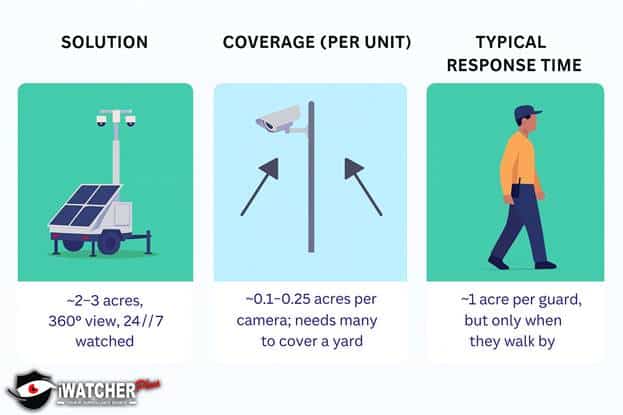
In practice, the most effective setups use both:

  • 1 to 4 solar mobile security trailers on corners and high risk zones
  • Fixed cameras on site offices, internal doors, cash handling areas, and gates
  • One or two PTZ units on cranes or rooftops for sweeping views

This mix gives you flexibility during construction, then leaves you with a strong fixed system after trailers are picked up.
image

Local recording vs cloud recording

  • Local NVR / DVR: Records on site (inside a trailer, office, or secure cabinet). Keeps recording during internet outages. Good for high frame rates and long retention if you size storage correctly.
  • Cloud recording: Sends clips or full streams to secure data centers. You can review video even if the NVR is damaged or stolen. Good for multi site portfolios and sharing incidents with insurers or police.

Most large sites do best with a mix: local recording for full quality plus cloud for alerts and important clips.

Power and connectivity for big, changing sites

You cannot protect a site if cameras and trailers keep dropping offline. Power and connectivity planning is just as important as picking the cameras.

Getting power to cameras

Options include:

  • Wired power from a panel or temporary power pole
  • Solar with battery backup on mobile security trailers
  • Hybrid: wired where easy, solar for far corners

Solar mobile surveillance trailers are popular across Southern California because they keep running through outages, and you avoid trenching or pulling cable just for temporary security.

Network options: Wi Fi, 4G, 5G, wired

  • Wired network (fiber or ethernet): Best stability and bandwidth when you have buildings up.
  • Wi Fi bridges: Good for linking a remote gate or laydown yard to the main office, if you have clear line of sight.
  • 4G / 5G cellular: Perfect for trailers and remote corners with no infrastructure yet.

A common setup on large California jobs is cellular for mobile trailers and wired or Wi Fi for fixed cameras as buildings come online.

What if the internet drops?

Properly designed systems keep recording locally when the internet connection drops. You might lose live view and alerts for a moment, but video is still saved on the NVR or inside the trailer, then remote access comes back once the link recovers.

Covering remote corners of large sites

If the site is very spread out or has hills:

  • Add an extra trailer in remote areas
  • Use higher masts to see over stockpiles
  • Use wireless bridges or point to point radios
  • Group high value items closer to existing coverage when possible

CISA and other federal guidance also recommend a layered security approach that mixes people, policies, and technology instead of relying on a single barrier. (CISA | Cybersecurity and Infrastructure Security Agency, 2022)

Monitoring, alerts, and what happens after something happens

Who should watch the cameras?

You have three realistic options:

In house staff

  1. Good if you have a 24/7 control room or guard shack
  2. Can respond quickly on site

Professional monitoring center

  1. Operators respond to smart alerts, talk down to trespassers, and call police when needed
  2. Works well with mobile security trailers and solar towers

Automated alerts only

  1. Motion or analytics send push alerts to phones
  2. Lower cost, but someone still has to respond

For most large sites, a monitored solution tied to your Construction Security Camera system makes the biggest dent in theft and vandalism.

How remote access helps

Modern systems give you:

  • Live view on phone or tablet
  • Quick timeline scrub to check yesterday’s shipment
  • Easy clip sharing with police, insurers, and owners
  • Time lapse tools for weekly progress meetings

This turns your cameras into both security and management tools.

Using footage after an incident

Footage is useful for:

  • Police reports and investigations
  • Insurance claims and liability questions
  • Internal safety reviews and toolbox talks
  • Training subcontractors on access rules (Bureau of Justice Assistance, 2013)

Cost, payback, and budgeting for construction security cameras

Main cost pieces

When you price a Construction Security Camera setup for a large site, you usually pay for:

  • Hardware (cameras, NVRs, solar trailers, poles, mounts)
  • Installation and setup
  • Monitoring service (if you choose it)
  • Data (cellular SIMs, cloud storage)
  • Maintenance and re positioning as the site changes

You can either buy equipment or rent / subscribe to a managed service where trailers and monitoring are bundled.

Buying vs renting

  • Buying
    • Higher upfront cost
    • Better if you will reuse gear across many sites or keep it as a permanent system
  • Renting or subscription
    • Lower upfront cost
    • Easy to scale up or down by project
    • Good fit for solar mobile security trailers that may move often

Rough value comparison

These are rough planning ranges for a large California site. Actual prices will depend on site size, risk, and contract length.

Value Comparison Table

OptionBest forTypical cost range*StrengthsLimits
1 mobile security trailer with monitoring2 to 4 acre open siteOften low four figures per monthFast install, solar power, loudspeaker, strong deterrentRental cost continues monthly
12–24 fixed IP cameras with NVRLong term yard or finished buildingMid to high five figures one time plus small monthlyGreat coverage of entries and interiors, long lifeLess flexible if site layout changes
1 on site guard overnightHigh risk periods or small urban footprintOften more than a trailer per monthHuman judgment, can move aroundNeeds breaks, can miss incidents, no recorded video

*These are planning figures only, not a quote.

Now compare those numbers with theft data. A single equipment theft event in the U.S. often runs around $30,000 once you include indirect costs, and thousands of such cases happen each year. (Deep SentinelShrestha & Osborne, 2019)

If the right Construction Security Camera system prevents even one major incident over a long project, it usually pays for itself.


Compliance, privacy, and legal basics for California sites

California allows video surveillance in public work areas like open job sites, entrances, and parking lots, as long as people do not have a reasonable expectation of privacy. At the same time, the state and federal law both restrict cameras in private areas such as restrooms and some break spaces, and audio recording has stricter consent rules. (D.Law) (California Constitution art. I, § 1; Cal. Lab. Code § 435; Cal. Penal Code §§ 632, 647(j))

Key points to keep in mind:

  • Do not place cameras in bathrooms, locker rooms, or similar spaces
  • Be careful with break rooms and employee only areas; new bills in 2025 add limits there (California Senate Judiciary Committee, 2025)
  • Avoid recording audio unless you have clear legal advice and consent where needed
  • Post clear signage where cameras monitor workers or the public, even if not strictly required
  • Use written policies so workers know where cameras are, how footage is stored, and who can access it

How long to keep footage

Most construction sites keep video for 30 to 90 days, longer for higher risk projects or where contracts require it. For incidents involving theft, injury, or claims, you should archive related clips securely as long as your legal or insurance advisors recommend.

Access and download rules

Good policy includes:

Again, this article is general guidance only. For legal questions on Construction Security and cameras, talk with a California employment or construction attorney.


How to design and deploy a system on a large site

Designing a Construction Security Camera System is easier with a simple checklist.

Step by step layout planning

  1. Map your assets
    • Main entrances and exits
    • Laydown yards and material storage
    • Fuel tanks and generators
    • Site office and parking
    • Cranes and high vantage points
  2. Mark high risk zones
    • Copper and wire storage
    • Tool containers
    • Isolated corners near public roads
  3. Place mobile units
    • Corner spots where one trailer can see two fence lines
    • Near key entry points and storage areas
  4. Add fixed cameras
    • On office trailers, gate arms, interior spaces, and loading doors
  5. Plan for change
    • Decide when trailers will move as buildings rise
    • Include camera updates in phase meetings

How many cameras do large sites need?

There is no single number, but a common pattern for multi acre projects is:

  • 2 to 4 mobile security trailers for overall coverage
  • 8 to 24 fixed cameras for gates, offices, and internal traffic
  • Extra PTZ units on cranes or rooftops for long range views

Tighter urban projects in Los Angeles might use more fixed cameras and fewer trailers, while open sites in Jurupa Valley or Moreno Valley may lean heavier on solar towers.

Common mistakes to avoid

  • Waiting until after the first big theft to act
  • Picking cameras with poor night performance
  • Not planning for power and internet early
  • Buying cheap systems that cannot handle dust, heat, or tall masts
  • Setting up alerts but never assigning anyone to respond
  • Forgetting to adjust camera angles as the project progresses

Questions to ask any vendor

  • How many large construction sites like mine have you secured in California?
  • Can you provide a clear map showing all camera views?
  • What happens if a trailer or camera fails at 2 a.m.?
  • Who owns the equipment at the end of the project?
  • How long is video stored, and where?
  • Do you help with police reports and incident exports?


Example solutions that work well on big California sites

At iWatcher plus, typical large site builds in 2025 look like one of these three patterns:

  1. Solar mobile surveillance core
  • 2 to 4 solar mobile security trailers with 20 to 30 foot masts
  • Mix of PTZ and fixed lenses on each mast
  • Built in loudspeakers and strobe lights
  • 4G or 5G connection plus local NVR in each unit
  • Live monitoring during nights and weekends

Best for: wide open sites from Riverside to San Diego with limited power.
Key strengths: fast deployment, strong deterrent, easy to move as grading changes.
Limits: ongoing monthly fee; some sites still benefit from a few fixed cameras near offices.

  1. Hybrid fixed plus trailers for long term yards
  • 1 or 2 mobile security trailers on corners
  • 12 to 24 fixed IP cameras on buildings and poles
  • Central NVR with cloud backup
  • Remote access for project managers and ownership teams

Best for: big general contractors with permanent yards or repeat projects in the same location.
Key strengths: long term asset plus temporary coverage where needed.
Limits: minor upfront design work; best with a partner that understands both construction and permanent security cameras.

  1. Urban high rise build in Los Angeles or Orange County
  • 1 trailer where space allows, often in the staging area
  • Fixed cameras on scaffolding, lifts, and nearby parking
  • Strong focus on access control and worker safety zones

Suitable for: tight downtown spaces where trailer placement is tricky.
Key strengths: strong evidence for city inspections, neighbors, and claims.
Cons: more planning, coordination with city and building owners.


Local case studies

Case study 1: 18 acre equipment yard in Moreno Valley

Problem: A civil contractor kept losing small loaders, fuel, and copper coils from an 18 acre yard. They had a single guard at the gate and basic floodlights. Theft losses crossed six figures over one summer.

Solution:

  • Deployed 3 mobile surveillance trailers on corners with 4 MP PTZ cameras and loudspeakers
  • Added 10 fixed cameras on the office, main gate, and fuel station
  • Set up smart alerts for people and vehicles entering after 6 p.m.

Results over the next year:

  • One attempted theft stopped after a live talk down and siren
  • No successful equipment thefts
  • Insurance carrier gave positive feedback on risk controls

The project manager later told us, “The trailers paid for themselves before the second month was over.”

Case study 2: Urban mixed use build near downtown Los Angeles

Problem: A GC working near a busy street was worried about trespassing, worker safety, and neighbor complaints about noise and dust.

Solution:

  • One compact mobile security trailer squeezed into the corner of the staging yard
  • 14 fixed cameras covering entrances, roof edges, and nearby sidewalks
  • Time lapse feature for weekly owner meetings
  • Clips shared with subs after near misses on fall hazards

Results:

  • Trespassing complaints dropped
  • A worker injury claim was resolved quickly using clear video
  • The owner loved seeing the job progress without constant site visits

For similar projects, we often tie in our construction security cameras systems Los Angeles services so teams can reuse the same approach on future jobs across the region.


How to choose the right provider in California

Picking the right partner for your Construction Security Camera setup is as important as picking the gear.

Look for:

  • Real construction site experience, not just small retail installs
  • California contractor license for security camera installation (required for many projects)  (Contractors State License Board, n.d.)
  • Fast support when a trailer or camera goes down
  • Simple, clear pricing without hidden fees for data or storage
  • Written plan for phase changes and moving equipment
  • Solid online reputation; you can check Our yelp reviews to see how iWatcher plus treats local clients

Quick questions we hear from construction managers

Do I still need guards if I have Construction Security Camera Systems in place?

Sometimes yes, sometimes no. On very large or sensitive sites, cameras and mobile security trailers work best with at least one roving guard. On many projects, though, trailers plus live monitoring replace some or all guard hours at night.

Can mobile security trailers work on bare lots with no power or internet?

Yes. Solar mobile security trailers are designed for exactly that. They use panels and batteries for power and 4G or 5G cellular for connectivity.

What happens if someone steals the trailer or cuts the power?

Trailers are usually anchored, alarmed, and often have tamper sensors. If power is cut or a door opens at the wrong time, monitoring teams get alerts and can call police. Video stored in the cloud is still safe.

How long should we keep construction security footage?

Most sites aim for at least 30 days. Busy or higher risk projects often stretch this to 60 or 90 days. Your insurer or attorney may ask for longer retention for certain contracts.

Can one system cover multiple sites across Riverside, Anaheim, and San Diego?

Yes. Cloud managed Construction Security Camera Systems let you see all active jobs from one dashboard. We often design setups so trailers and NVRs can move between sites while keeping a shared login.

How does iWatcher plus help if we already have some cameras installed?

We can often tie your existing security cameras into a stronger design, add mobile units, and provide monitoring. If you are unsure what you have, we can audit the site and suggest upgrades or a fresh security camera installation service plan.

Simple 5 step process to pick the right system

Here is a quick, practical path:

  1. List your sites and main risks
    • Theft hot spots, safety worries, remote corners
  2. Grab a site plan or simple sketch
    • Mark entrances, storage, and offices
  3. Decide your budget range and project length
    • Short term rental vs long term asset
  4. Talk with a local Construction Security Camera specialist
    • Ask for a layout showing trailer and camera locations
  5. Approve and schedule install
    • Test alerts, train staff on how to use the app, and set review dates for phase changes

If you need to secure a site quickly this week, start with a mobile security trailer deployment on the highest risk areas, then add fixed cameras as the project develops.


Ready to protect your next project?

Big sites in Riverside, Los Angeles, Anaheim, Orange County, San Diego, Moreno Valley, Jurupa Valley, and across California face the same painful risk: one bad night can blow a month of profit. A smart Construction Security Camera System built around mobile surveillance trailers plus a few fixed cameras is usually the most flexible, cost effective way to keep your projects on track.

Security and legal reminder: this guide is general information only. Your final design and policies should be reviewed with your legal, insurance, and safety teams.

If you want a local team that knows construction, solar mobile security trailers, and fixed camera systems, iWatcher plus security solutions is ready to help.

Take two minutes, send us your site details, and let us do the heavy lifting.
Get a free quote now and we will help you design the right Construction Security Camera setup for your next large project.

1 Comment

  1. Alan Joyce December 5, 2025 at 7:57 pm

    Good read. Appreciate the breakdown, Bob!

    Reply

Leave A Comment

Your email address will not be published. Required fields are marked *

CAPTCHA